
A cushion against the market
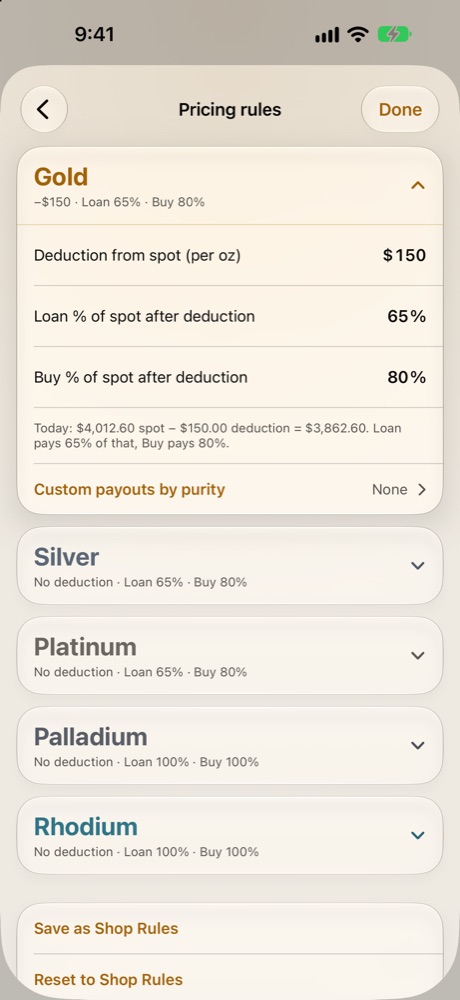
Take a set amount per troy ounce off spot before your percents, for each metal. Your loans and buys are priced below the market, so a drop before you sell the metal doesn't eat your margin.
- A deduction for each metal, in dollars per troy ounce
- Today's price after it, right on the screen
- Loan and buy percents taken from what's left
- Locked behind your PIN, Face ID or Touch ID
How AuIQ prices a piece
(spot − your deduction) × purity × weight × your percent
A 10 g 14K ring, gold at $4,012.60, Buy 80%, Loan 65%
| Buy | Loan | |
|---|---|---|
| No deduction | $603.76 | $490.55 |
| $150 deduction | $581.19 | $472.22 |
You price gold from $3,862.60 an ounce.
With a $150 deduction you're priced as if gold were already $150 lower. Example prices.
Show the customer the offer, not your margin
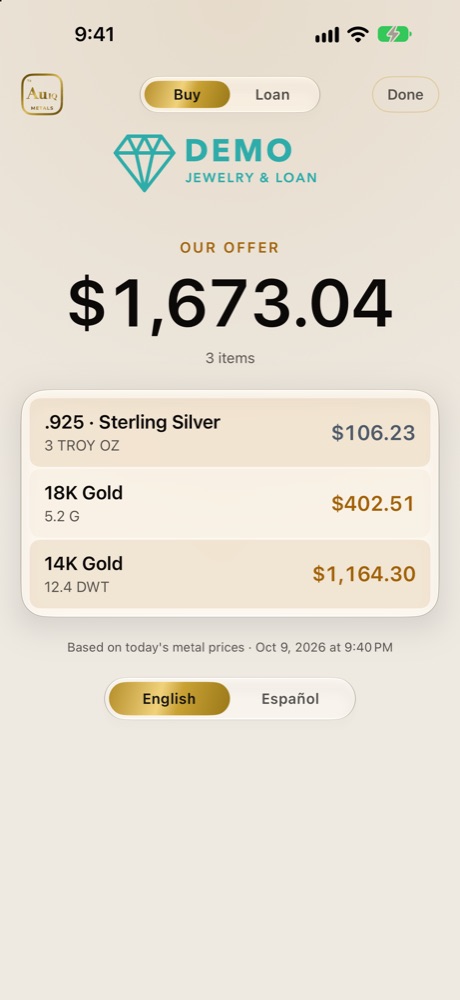
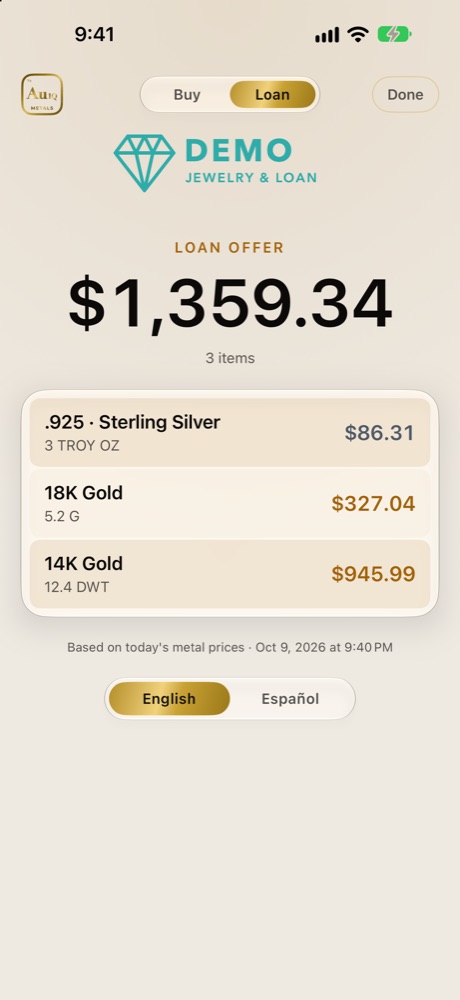
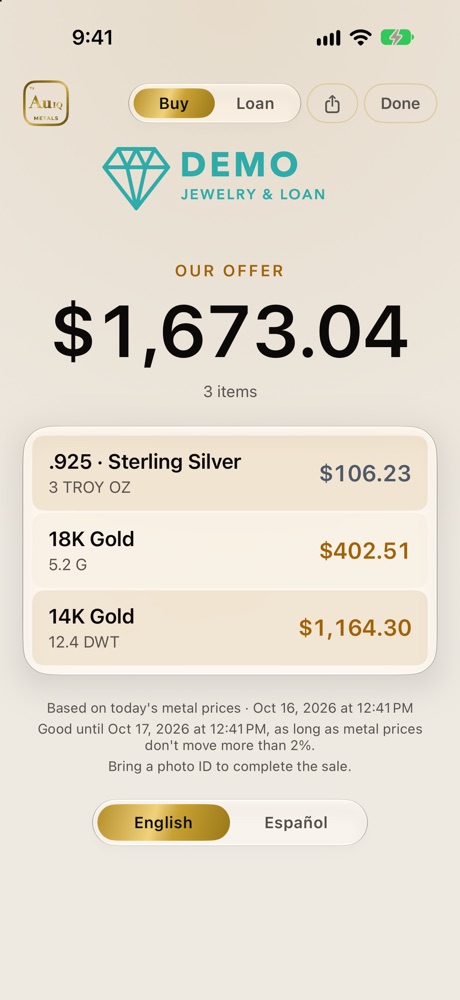
One tap on the Stack turns the phone around into a clean offer screen with your shop's logo on top.
- Buy or Loan, one tap to switch
- Each piece and the total, in English or Spanish
- Never shows spot, your percents or your rules
- The screen stays on while they read it
Every karat, every pile
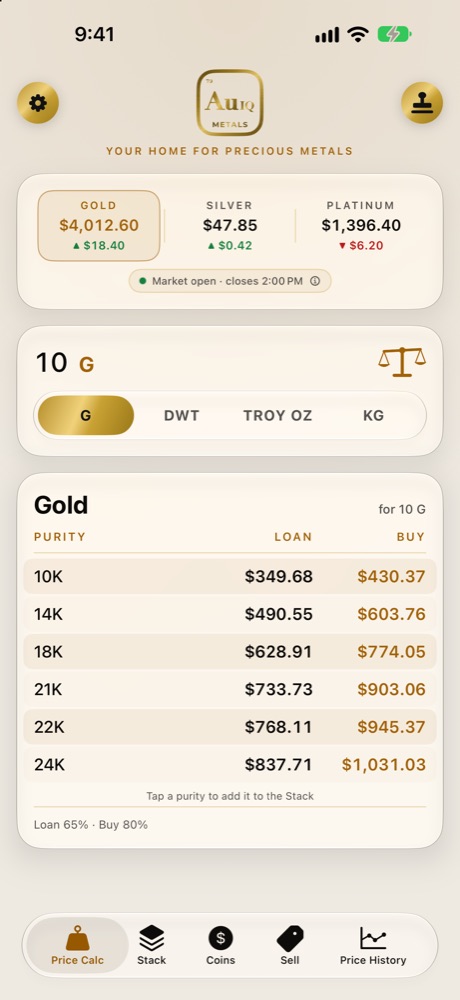
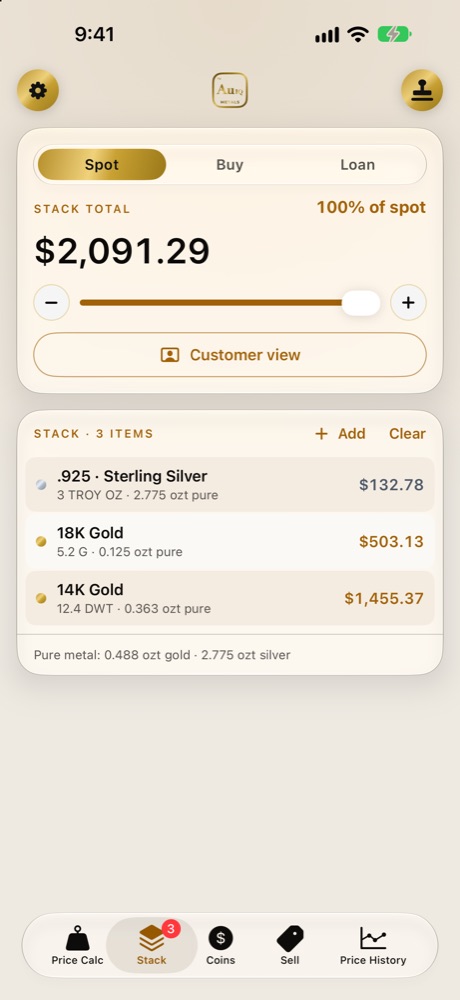
Type the weight once and read loan and buy side by side for every karat. Put the whole pile on the Stack for one offer.
- 9K to 24K gold, silver, platinum, palladium and rhodium
- Grams, pennyweight, troy ounces or kilograms
- Rings, chains and coins on one Stack
- Switch the Stack between Buy and Loan
Let them think it over
Text or email the customer their offer as a card with your shop's logo and your terms on it. They leave with the number, and you've said how long it holds.
- Text or email it from the customer's offer screen
- Your logo on the card, in English or Spanish
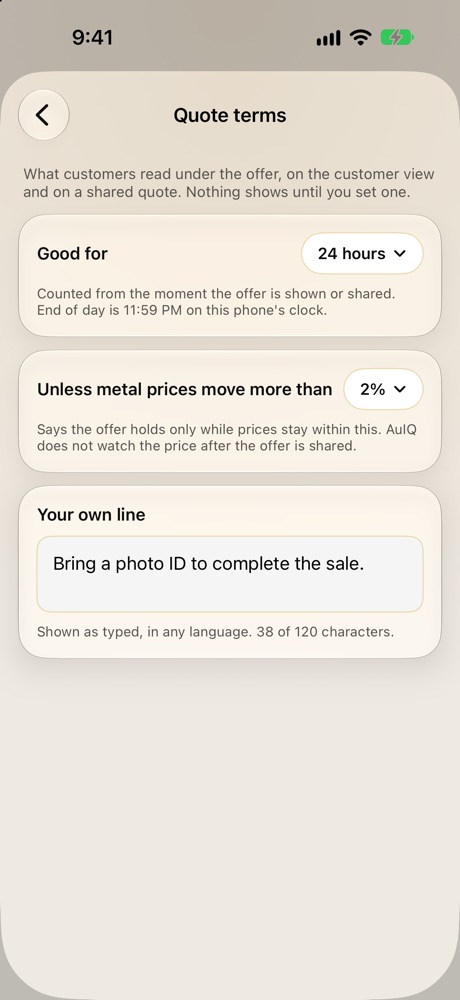
- Your terms on it: good for end of day, 24 hours, 3 days or 7 days, and how far metal can move, from 1 to 5%
- Set by the admin in Settings, behind your PIN, Face ID or Touch ID
Keep your system. Add the prices.
AuIQ doesn't replace your pawn or point-of-sale software. It prices the piece at the counter, then you write the ticket in your system as you do today: tickets, inventory and the records your state requires stay where they are.
Set your prices
Loan and buy percents per metal
Your own loan and buy percents for gold, silver, platinum, palladium and rhodium, each taken from spot after your deduction.
A percent for any karat
Pay a different loan or buy percent for any purity: more for 24K bullion than for 10K scrap, if that's how you buy.
Round to the dollar
Round prices up or down to the whole dollar, so the counter never quotes cents.
Your Shop Rules
Save your numbers as Shop Rules, and go back to them with one tap after any change.
Buy-only shops
Don't do loans? Turn Loan prices off and every screen shows only what you pay.
Only what you buy
Hide the metals and karats you never take in, so Price Calc shows just yours.
At the counter
Weights stay private
Customers see items and prices. Turn weights on in Settings → For customers.
Lower a price on the spot
Tap an item's price in the Stack and type a lower number to close a deal. Never above your quote, and the customer only sees the final price.
Prices hold during a deal
Once the first piece is in the Stack, its metal prices stay put, so a market update can't change an offer mid-conversation.
Print the offer
Print the customer's offer on an AirPrint receipt printer or a regular page, with your logo, your quote terms and your own line.
Ask Siri for a price
Say "Price 14K in AuIQ", then the weight, and Siri tells you the buy and loan price at your shop's prices.
Read any stamp
585, .925, PT 950, 1/20 14K GF, RGP: what the mark means, and for karat stamps, straight to the price.
Coins at melt
Melt value, buy and loan for more than 80 US and world gold and silver coins, with photos.
Pure metal totals
The Stack adds up the pure gold and silver in a deal, in troy ounces.
Price to weight
The customer wants $300? Switch Price Calc from Weight to $, type the amount, and read the weight it buys for each karat at your loan and buy prices.
Nothing left on screen
The Stack clears itself a minute after the last tap, with Undo, before the next customer.
Home Screen shortcuts
Press and hold the AuIQ icon to jump to New deal, the Price board or Coins.
When the internet drops
AuIQ keeps the last prices on the phone, so the counter keeps working.
Opens in your unit
Price Calc can open in pennyweight, grams, troy ounces or kilograms, whichever your scale reads.
Your staff
Approve from your Apple Watch
When staff ask to pay more than your price, answer from your wrist.
Request approval
Staff who want to pay more than your price ask your phone, with the karat, weight and percent of spot. You approve or decline in a tap, and on your own phone your PIN does it.
Store announcements
Send a short note to every staff phone, like "No loans on watches today". It stays at the top of AuIQ until they tap Got it.
Everyone on your prices
Staff scan your store's QR code and their phones use your Pricing rules from then on.
No one else changes them
Pricing rules open only with your PIN, Face ID or Touch ID. Staff phones can look, never change.
Know every phone
Name each staff device, see when it was last used, and remove one any time.
Staff never pay
Each staff device adds $2 a month to your plan: $6.99 with one, $24.99 with ten. An Apple Watch doesn't count. Nothing to buy on theirs.
A tour for each role
The first time AuIQ opens, admins and staff each get a short tour made for them. Replay it any time in Settings → About.
A discreet icon
A Stealth app icon that doesn't advertise gold on the home screen.
Give a month, get a month
Share your store's code. When a shop you refer pays for its plan, you both get a free month.
Ahead of the market
Live prices
New prices every 10 minutes while the metals market is open, with today's move for each metal.
Market hours and holidays
See whether the market is open and when it reopens, on your own clock.
Price alerts
Prices at two times a day you pick, and each metal's week every Sunday morning.
The trend
Price charts from today back to 2019, to see where gold has been before you lend on it.
Around the shop
Your store's colors
Pick a background color for every phone in your store, from 19 colors or your own brand color. Staff can choose their own; customers always see your store's.
iPad side by side
On an iPad in landscape, Price Calc and the Stack sit side by side, so each piece you add lands in the deal right away.
A price board
Today's buy prices on a counter or window screen, with your logo, in English, Spanish or both taking turns.
Sell above spot
Set your sell prices as a percent of spot or dollars over spot, rounded to the dollar, 5 or 10.
StandBy
Turn your iPhone on its side while it charges and AuIQ becomes a counter display.
iPad, Mac and Apple Watch
The same prices on the counter iPad, the office Mac and your wrist.
Widgets and the Lock Screen
Prices on the Home Screen and Lock Screen, and live in the Dynamic Island.
In English and Spanish
Every screen in Spanish with one setting, and the customer's offer has its own switch.
Try it at your counter free for up to 10 days
Then from $4.99 a month for your store. Staff never pay.
See the plans